
Agent-based or agentless?#
Guardian scans a node by running commands on it. An Agent installed on the node can run them, or a Connection Manager can run them remotely. Both produce the same results, so the choice is about access and upkeep, and most estates use both.
Applies to: Guardian Classic Agents Connection Managers
At a glance#
| Agent-based | Agentless (default) | |
|---|---|---|
| Runs on | Each node you scan | A Connection Manager, scanning many nodes |
| Reaches Guardian over | HTTPS, port 443, from the node | HTTPS, port 443, from the Connection Manager |
| Reaches the node over | Nothing: it's local | SSH, WinRM or an API |
| Configuration lives | On every node | On the Connection Manager |
| Best when | A node can't be reached remotely | You want the least to install and maintain |
Note
Some node types can only be scanned agentlessly. See Add Nodes.
Agent-based#
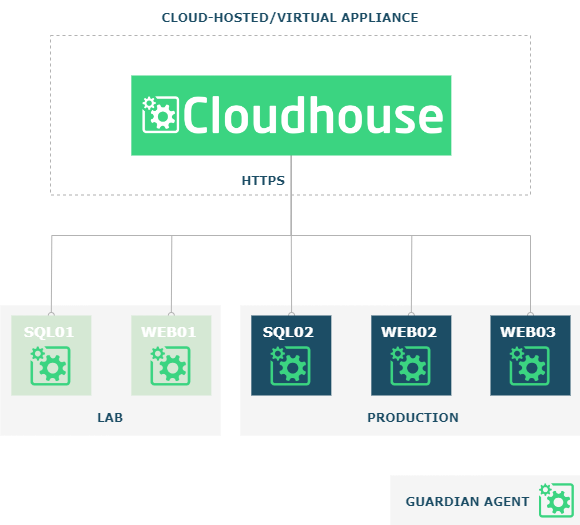
The Agent is installed on each node. It polls the Guardian appliance over HTTPS on port 443 every 10 seconds for work, and scans only the node it's on. See Guardian Agent.
When to use it#
- The node can't be reached remotely but can reach the appliance on port 443.
- The node's connection to the appliance or Connection Manager is unreliable, so remote scans don't run as expected.
- You can't put a Connection Manager where it would reach the node.
Pros and cons#
| Pro | Why |
|---|---|
| Easier troubleshooting | One node can be isolated, for example to change a timeout. |
| No extra VMs | Apart from the appliance, no virtual machines are needed for Connection Managers. |
| Port 443 only | Reaches nodes that can't be accessed remotely. |
| Windows | No service account: the Guardian service runs as Local System. |
| Linux | Scans files as root without any connection as root, because the Agent runs as root. |
| Con | Why |
|---|---|
| Install everywhere | The Agent must be installed on every node you add. |
| Slower roll-out | Deploying and updating each Agent takes time. |
| Slower changes | Changing configuration, such as a timeout, means updating every node's configuration file. |
Agentless (default)#
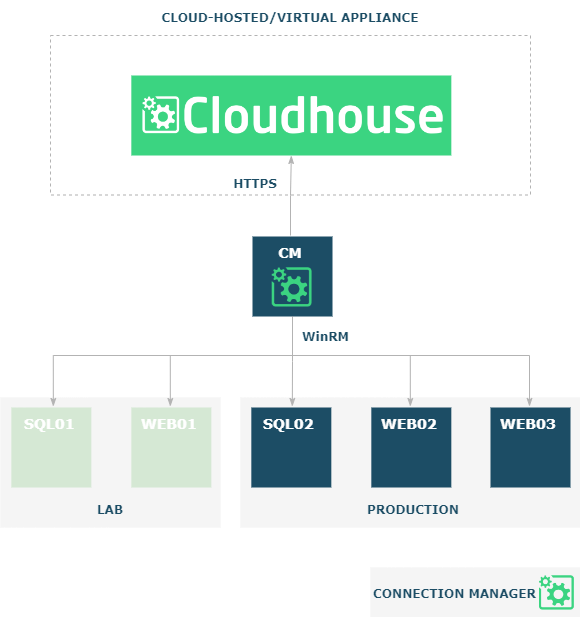
A Connection Manager connects to your nodes remotely over SSH, WinRM or an API, and is the one place you manage their configuration, logging and updates. One Connection Manager can scan more than a hundred nodes. It can run on the Guardian appliance or as a satellite on your network. See Connection Managers.
When to use it#
- You want the least to deploy and maintain: nothing is installed on the nodes, and configuration changes happen in one place.
- You want to add nodes quickly.
- You don't want the appliance to need access to your whole network. Spread Connection Managers through your network for fine-grained access control.
Pros and cons#
| Pro | Why |
|---|---|
| One place | Configuration changes happen on the Connection Manager only. |
| Nothing to set up | The appliance includes a built-in Connection Manager. |
| Less to maintain | Less overhead deploying and maintaining nodes. |
| Easy to add nodes | No software to install on the node. |
| Con | Why |
|---|---|
| Connection Manager needed | Windows and Linux nodes each need their type of Connection Manager. |
| Windows | A service account with local administrator rights on every node. |
| Linux | Scanning files as root needs the remote helper. |
About the remote helper
The remote helper lets the Connection Manager connect as root. It's only used during scans, typically once a day, which limits the risk.