
Manage multiple API keys#
If you are managing multiple organisational accounts within a Guardian appliance and want to integrate with each via the API you will need to manage how API keys and secrets are switched when accessing different accounts.
Applies to: Guardian Classic
Overview#
Each organisational account within Guardian can be assigned an API key and secret pair so that data can be accessed and edited via the API. For security reasons, we assign a key and secret pair per organisation so that data within each organisation is help completely separate. There is no single master API key pair or secret that can cross the boundary between organisational accounts.
This guide provides some advice and sample code as to how to work with the API when interfacing with more than on account at a time.
Store each key pair#
Each organisation has one key pair and also has a unique ID, so each API key and secret pair can be stored relative to an organisation's ID. You may choose to store your credentials as environment variables, CSV or JSON format when scripting for multiple accounts. Here we've provided some example formats that might work.
Linux/Unix Shell environment variables#
export ORG_2_API_KEY=1234...
export ORG_2_SEC_KEY=5678...
export ORG_5_API_KEY=9876...
export ORG_5_SEC_KEY=4567...
JSON file#
{
  "2": {
    "api_key": "1234...",
    "sec_key": "5678...",
  },
  "5": {
    "api_key": "9876...",
    "sec_key": "4567...",
  }
}
CSV file#
org_id,api_key,sec_key
2,1234...,5678...
5,9876...,4567...
Where do I find an org ID?#
In the UI you can reference an organisational account's ID by navigating to the top right menu and selecting Manage Accounts. This should list our all accounts you have access to in the appliance. If you click on an account name it will navigate to the settings view for the chosen account. The number in the URL bar is this account's "org ID". In the example below, the "Org ID" is 43.
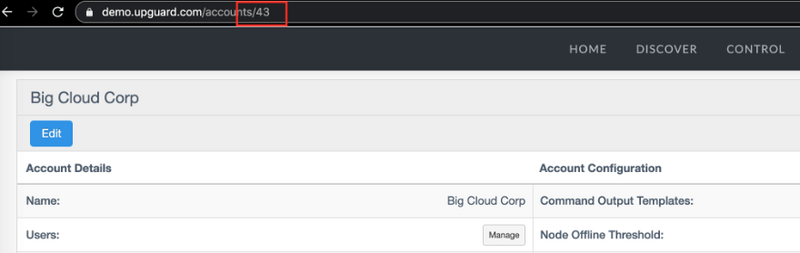
You can also lookup the ID of an account using the Accounts Index API endpoint. Conveniently, if you want to programmatically switch between organisational accounts using the account name rather than ID, this endpoint also provides the account's name. Calling this endpoint with the example above would give output like the following:
[
  {
     "id": 43,
     "role": "Administrator",
     "name": "Big Cloud Corp",
     "status": 1
  }
]
Select the correct API key and Secret in code#
Here we are going to provide a number of examples based on storing your org keys and secrets in a JSON file format. If you see a file format or programming language missing that you require, please contact Guardian Support.
Python example - JSON file#
import requests
import json

creds = None
with open('creds.json') as json_file:
    creds = json.load(json_file)

def make_http_headers(org_id):
    if str(org_id) in creds:
        c = creds[str(org_id)]
    return {
      'Authorization': 'Token token="' + str(c['api_key']) + str(c['sec_key']) + '"',
      'Content-Type': 'application/json'
    }
    else:
        raise Exception("Failed to find credentials for org_id=" + str(org_id))

...
# then anytime you need to make an API call
org_id = 2

response = requests.get(url, headers=make_http_headers(org_id))

print(response.status_code)
print(response.text)
Python SDK example - JSON file#
import upguard
import json

instance_url = "https://me.cloudhouse.com"

creds = None
with open('creds.json') as json_file:
    creds = json.load(json_file)

org2 = upguard.Account(instance_url, creds["2"]["api_key"], creds["2"]["sec_key"])
org5 = upguard.Account(instance_url, creds["5"]["api_key"], creds["5"]["sec_key"])

...
# then anywhere in the code you can use either the 'org2' or 'org5' object and each
# corresponding key pair will be baked in

# e.g. list all nodes in org2
for n in org2.nodes():
    print(n.name)

# e.g. list all users in org5
for u in org5.users():
    print(u.email)
Ruby example - JSON file#
require 'httparty'
require 'json'

$creds = JSON.parse(File.read("creds.json"))

def make_http_headers(org_id)
  if $creds.include?(org_id.to_s)
    c = $creds[org_id.to_s]
    return {
      "Authorization" => "Token token=\"#{c['api_key']}#{c['sec_key']}\"",
      "Content-Type" => "application/json"
    }
  else
    raise "Failed to find credentials for org_id=#{org_id}"
  end
end

...
# then anytime you need to make an API call
org_id = 2

response = HTTParty.get(url, :headers => make_http_headers(org_id))

puts response.code
puts response.body
Ruby SDK example - JSON file#
require 'upguard'
require 'json'

instance_url = "https://me.cloudhouse.com"

creds = JSON.parse(File.read("creds.json"))

org2 = UpGuard::Account.new(instance_url, creds["2"]["api_key"], creds["2"]["sec_key"])
org5 = UpGuard::Account.new(instance_url, creds["5"]["api_key"], creds["5"]["sec_key"])

...
# the anywhere in the code you can use either the 'org2' or 'org5' object and each
# corresponding key pair will be baked in

# e.g. list all nodes in org2
org2.nodes.each do |n|
  puts n.name
end

# e.g. list all users in org5
org5.users.each do |u|
  puts u.name
end