
August 2025 monthly release#
For help upgrading to the latest version, contact your Cloudhouse Representative. The following table describes each component available to upgrade within this release of Guardian. For more information on the known issues currently present within Guardian, see Known Issues.
Applies to: Guardian Classic
Tip
To access a more simplified view of the changes included within this release, see August 2025 Changelog.pdf.
| Last Updated | Release Date | Guardian Platform | Guardian Web | Linux Agent | Windows Agent |
|---|---|---|---|---|---|
| 29th August 2025 | 27th August 2025 | V4 | V3.58.3 | V5.46.0 | V5.22.0 |
Guardian web application v3.58.3#
Here's what's included in V3.58.3 of the Guardian web application as part of the August 2025 monthly release.
New features#
The following new features are included within this release of the Guardian web application.
New import/Export scan options#
We have added two new buttons to the Scan options drop-down list, displayed when editing a node group's settings:
- Import Scan Options – Option to upload a JSON file containing a list of scan directory options to the node group's settings.
- Export Scan Options – Option to export the node group's scan directory options as a JSON file, downloaded locally to your machine.
Tip
These buttons have been added to the default Monitored skin, but were already present with the new Monitored skin enabled. This enhancement ensures broader accessibility of scan options.
Other Enhancements#
The following enhancements are included within this release of the Guardian web application.
Global enablement of Pluggables feature#
The Pluggables feature has been updated to ensure consistent behaviour across all organisations within an appliance. Previously, enabling Pluggables in one organisation (e.g., ORG1) did not activate the feature for others (e.g., ORG2), resulting in limited access and functionality.
Note
If the Pluggables feature is enabled, the Pluggables tab (Inventory > Pluggables) is displayed, allowing you to extend Guardian’s capabilities and customise its functionality to meet your needs via the use of pluggables such as FortiGate.
This enhancement introduces a centralised setting to manage Pluggables globally, with the following key changes:
-
Centralized Control: A new Enable Pluggables checkbox is available within Guardian's General Settings (Account drop-down menu > Settings > General):
- When enabled, Pluggables functionality is available to all organisations.
- When disabled, Pluggables are unavailable across the appliance.
-
Feature Flag Removal: The Pluggables feature has been removed from the Features page, which is only accessible to the Guardian team, to prevent per-org toggling and remove dependency on the Guardian team to enable/disable the feature for each user.
- Backward Compatibility: Appliances upgrading from a version with Pluggables enabled will retain the setting. Existing pluggables remain configured and usable post-upgrade.
This change simplifies feature management and ensures a consistent experience for all users across organisations.
Tip
In addition, we have simplified the Pluggables tab by removing the Default section. Now, the page only displays the custom pluggables that have been added to Guardian.
Security update: CIS benchmarks refresh#
As part of our ongoing commitment to security and compliance, we’ve updated our CIS benchmark checks to ensure alignment with the latest standards.
Tip
No action is required from users. Benchmark updates are applied automatically and will be reflected in future compliance assessments.
Support for larger scan results#
Recent Rack query parser updates added parameter and bytesize limitations which prevented larger scans from completing successfully. We have now increased these limits to accommodate larger scan results.
Scan Docker or Kubernetes containers#
The Add Node page (Inventory > Add Node) and Edit Node page (Inventory > Monitored > Select a node group > Select a node > Edit) have been updated to include scanning for Linux-based Docker containers and Kubernetes pods and deployments. To enable this feature on your appliance, contact your Cloudhouse Representative.
Tip
Scanning Docker or Kubernetes containers requires the most recent version of the Connection Manager, as well as remote helper to be running. To download the most recent version of the Connection Manager, click here. For more information on Connection Managers, see Connection Managers.
Fixed issues#
The following issue has been fixed within this release of the Guardian web application.
- Affects Versions: V3.52.0
- Fix Version: V3.58.3
- Problem
-
For Azure Active Directory and LDAP integrations, when performing a 'Synchronize Nodes' job, it would run successfully but any detected nodes were not added to the Detected or Monitored tabs as expected.
Note
For more information on node detection jobs, see Synchronise Nodes – Job Type
- Solution
- We have corrected the logic that handles node detection results. Now when a 'Synchronize Nodes' job is run for an Azure Active Directory or LDAP integration, any detected nodes are correctly added to the Detected or Monitored tabs as expected.
- Affects Versions: V3 (onwards)
- Fix Version: V3.58.3
- Problem
-
The Preprocessor section was only visible when editing a node group's scan options. It was not displayed when accessing the node group's settings directly, preventing users from configuring preprocessors unless a node had already been added to the group.
Note
For more information on scan options, see Scan Options.
- Solution
-
The Preprocessor section is now included on the node group settings page, allowing users to view and edit Preprocessor settings directly from the node group configuration, regardless of whether any nodes have been added. This improves usability and ensures consistent access to scan configuration options.
Note
For more information on preprocessors, see Preprocessors (Linux only).
- Affects Versions: V3 (onwards)
- Fix Version: V3.58.2
- Problem
-
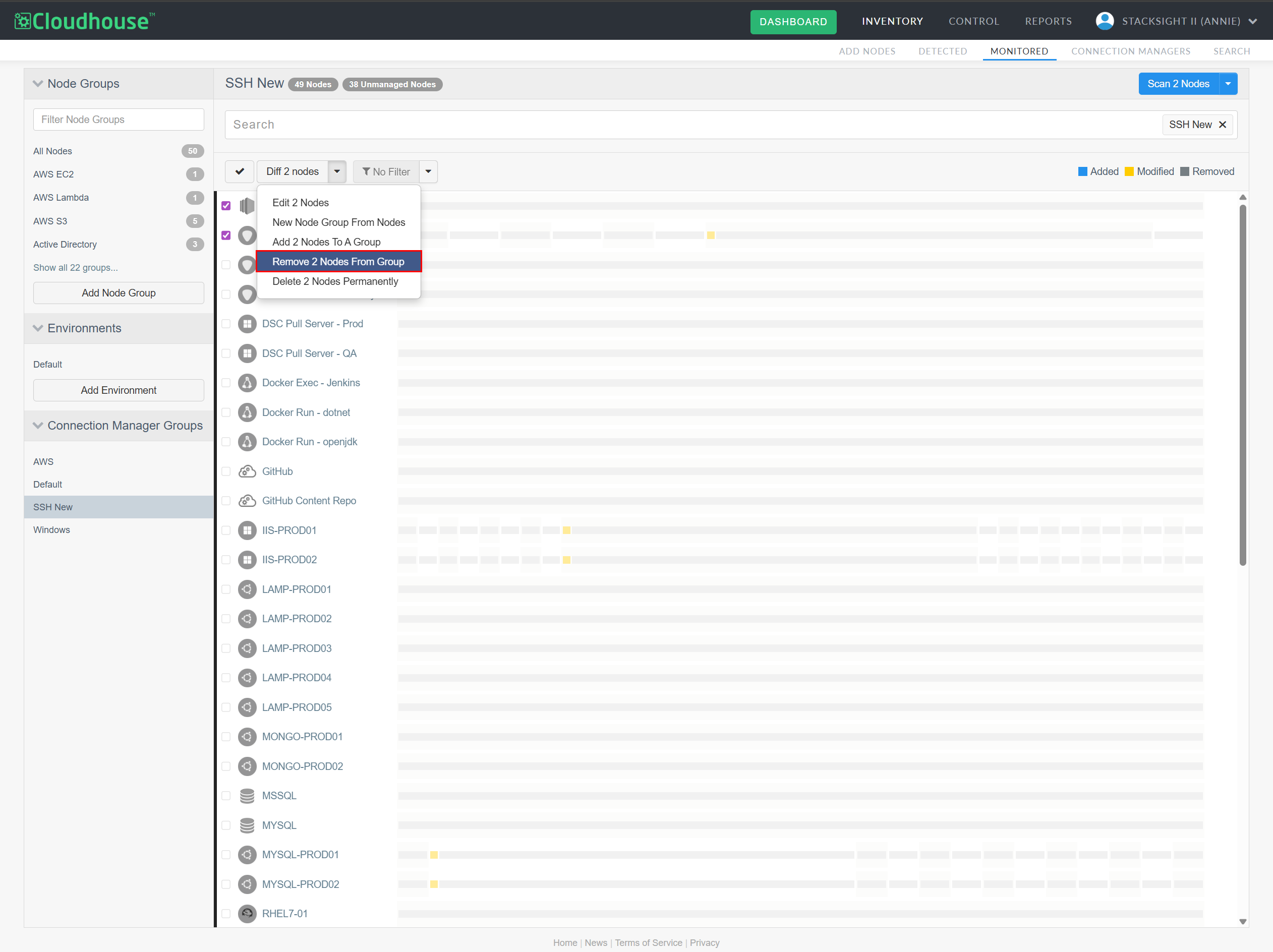
When viewing nodes within a Connection Manager group, if you selected the checkbox for one or more nodes and then click the Diff X Nodes drop-down button, the Remove X Nodes From Group option would be incorrectly displayed. This action pertains to node groups, not Connection Manager groups, and its presence in this context was misleading.
Note
For more information on Connection Manager groups, see Connection Manager Groups.
- Solution
- The Remove X Nodes From Group option has been removed when viewing nodes in a Connection Manager group. This ensures that only relevant actions are available, improving clarity and preventing confusion between Connection Manager and node group functionalities.
Linux Agent v5.46.0#
Here's what's included in V5.46.0 of the Linux Agent as part of the August 2025 monthly release.
New features#
There are no new features included within this release of the Linux Agent.
Other Enhancements#
The following enhancement is included within this release of the Linux Agent.
Scan Docker and Kubernetes containers#
You can now scan Docker containers and Kubernetes pods or deployments within Linux nodes. For more information, see the Other Enhancements section of Guardian Web Application V3.58.0 above.
Fixed issues#
The following issue has been fixed in this release of the Linux Agent.
- Affects Versions: V5 (onwards)
- Fix Version: V5.46.0
- Problem
- Connectivity checks for Cisco nodes were reporting success even when the node had a non-existent or unreachable IP address.
- Solution
-
The connectivity check logic for Cisco nodes has been updated to correctly validate IP reachability and credential accuracy. The check will now only pass when presented with valid a IP/hostname and credentials.
Tip
This fix ensures consistent and reliable connectivity validation across node types.
Windows Agent v5.22.0#
Here's what's included in V5.22.0 of the Windows Agent as part of the August 2025 monthly release.
New features#
There are no new features included within this release of the Windows Agent.
Other Enhancements#
There are no additional enhancements included within this release of the Windows Agent.
Fixed issues#
The following issue has been fixed in this release of the Windows Agent.
- Affects Versions: V5 (onwards)
- Fix Version: V5.22.0
- Problem
-
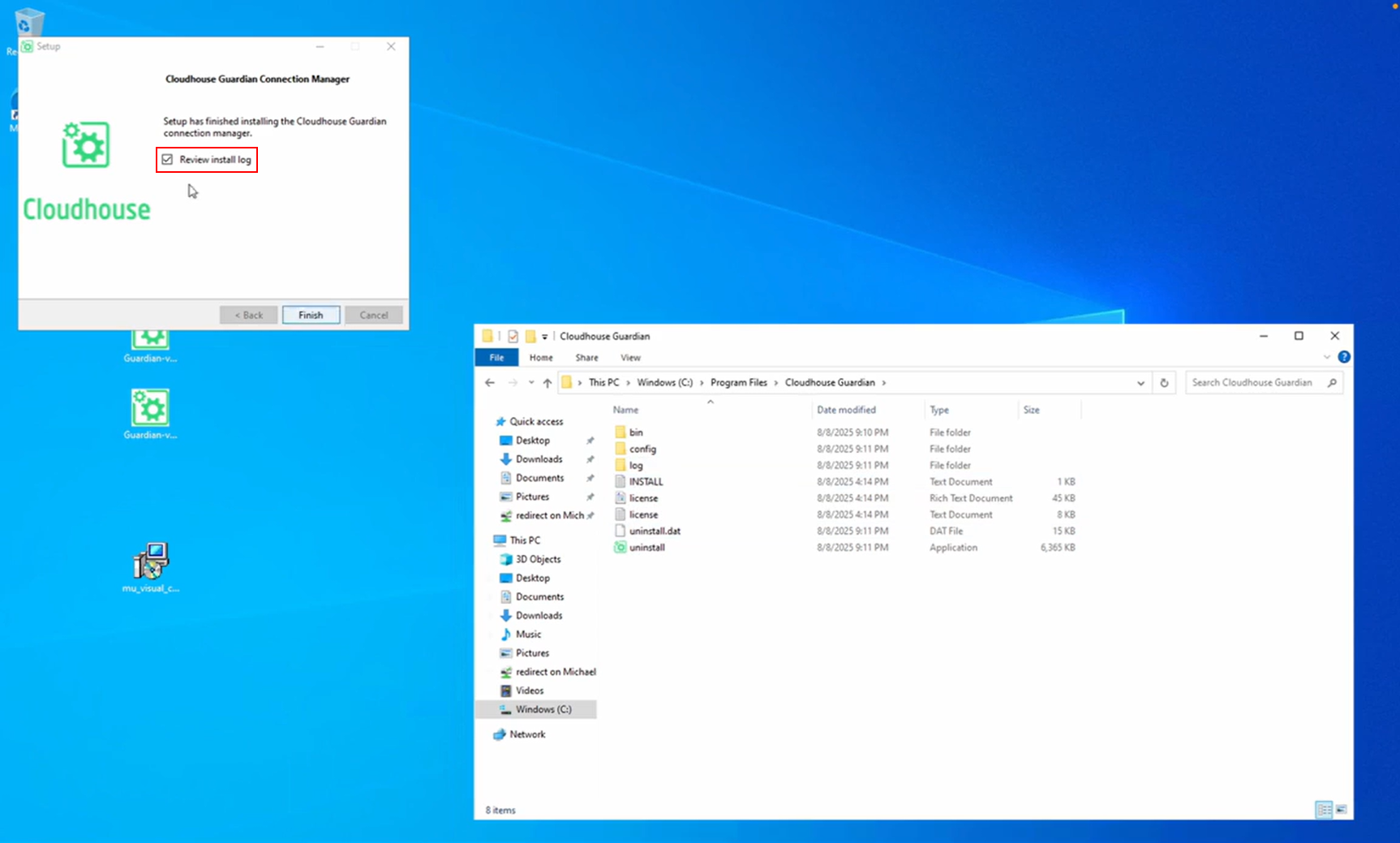
After the Windows Connection Manager has been installed, if you click Finish with the 'Review install log' box checked, the install log would not launch.
Note
For more information on the Windows Connection Manager installer, see Windows Connection Manager – Installer.
- Solution
- This was due to a timing issue in the installer, where the log file hadn’t been created before the installer attempted to open it. The fix ensures the log file is present before launch at the end of the installation process. Now, when you click Finish with the 'Review install log' box checked, the install log will open correctly.