
Deploying a package to AWS with Systems Manager#
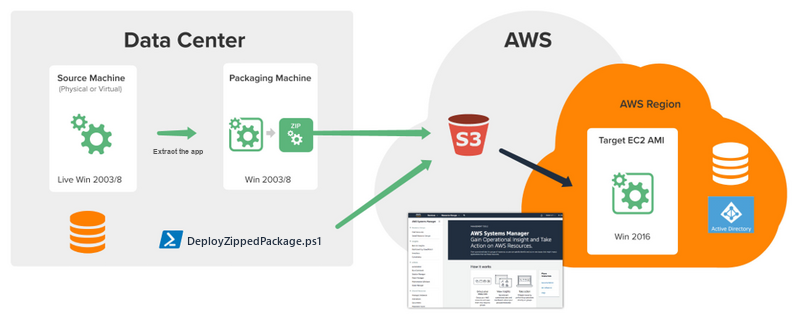
Cloudhouse Alchemy Compatibility Packages can be deployed to servers in Amazon Web Services (AWS).
Applies to: Alchemy
Note
See Sample Systems Manager Document for Deploying a Package to AWS for more details.
Deploy an Alchemy Compatibility Package to AWS#
To deploy an Alchemy Compatibility Package to AWS requires an Identity and Access Manager (IAM) user with permissions to:
- Administer all Elastic Compute Cloud (EC2) instances within the relevant region.
- Read from the Simple Storage Service (S3) resource(s).
Complete the following steps:
- The Systems Manager documents must also be in the same region as the EC2 instances.
- Create a ZIP of the Compatibility Package as detailed in Zipping and Deploying a Package.
- Upload the ZIP to an AWS S3 bucket and record the URL.
- Upload a copy of the
DeployZippedPackage.ps1script from Zipping and Deploying a Package to an AWS S3 bucket recording the URL. - Create a new AWS Systems Manager Document called
Cloudhouse-DeployPackage. - Paste the contents of Sample Systems Manager Document for Deploying a Package to AWS into the new document, then click Create document.
- Open the
Cloudhouse-DeployPackagedocument and click the Details tab followed by the Parameters tab to show the required/supported parameters. - From the Actions menu, select Run Command.
-
For each host and package, run the
Cloudhouse-DeployPackagedocument with the following settings:- Source Type – Set this to
S3. -
Source info – Set this to the URL of the S3 bucket the
DeployZippedPackage.ps1is stored on, for example:{"path" : "https://s3.eu-west-2.amazonaws.com/xxxxredactedname/DeployZippedPackage.ps1"} -
Source Zip – Set this to the URL of the S3 bucket the
Package.zipis stored on, for example:{"path" : "https://s3.eu-west-2.amazonaws.com/xxxxredacted-name/SQLServer2005-Package-1666.zip"} -
Command Line – Should be
DeployZippedPackage.ps1with the relevant switches (as detailed in Zipping and Deploying a Package), which extracts the zipped Compatibility Package and then runs theCloudhouse.Container.Deployment.exewith the specified deployment arguments (detailed in Deploy an Alchemy Compatibility Package to a Machine). For example:DeployZippedPackage.ps1 -sourcezip SQLServer2005-Package-1666.zip -deploycmd Cloudhouse.Container.Deployment.exe -deployargs '/deploydir c:\\programdata /deploytype machine /acceptEULA' -
Working Directory – Should be the folder to download the files to. For example
C:\Temp.
- Source Type – Set this to
-
On the Output screen, verify each step has run successfully (including expanding the Step 3 – Output section to verify the commands successfully ran).
- Sign in to the target computer the Compatibility Package has been deployed to.
- Verify the application is installed, loads, and functions as expected.