
Workflow
View Markdown
Publish a package in Citrix Virtual Apps#
When Cloudhouse Alchemy Compatibility Packages are deployed to a Citrix Virtual Apps server, they register file type associations and shortcuts for the applications. This enables Citrix Virtual Apps and Desktop Studio's publishing wizard to work in the same way for natively installed applications.
Applies to: Alchemy
Process to publish applications#
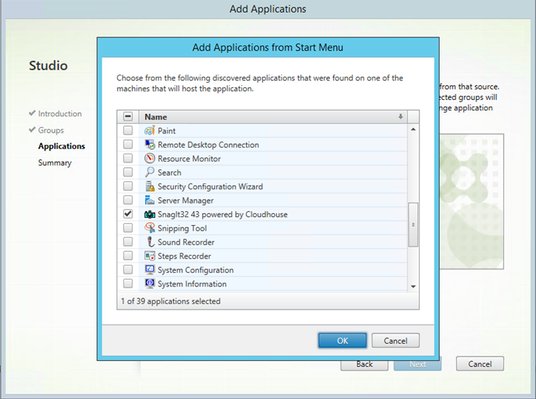
- Select Add Application.
- Select Add Application from the Start Menu then click OK.
-
Click Next to publish the application.
XenApp 6.5#
The instructions provided are for Citrix Virtual Apps (XenApp) 7.x. However, file type association and shortcut registration means an application can be published in the usual manner on XenApp 6.5.